
TikTok Shop: How to Open a Store That Sells — A Step-by-Step Guide for Creators & Entrepreneurs
Contents
TikTok Shop: How to Open a Store That Sells — A Step-by-Step Guide for Creators & Entrepreneurs
- How to Access TikTok Shop: A Step-by-Step Guide for Creators and Sellers: Primary Keywords: TikTok Shop setup, TikTok Shop guide, TikTok seller registration, TikTok Shop tutorial
Want to turn your TikTok audience into paying customers — without sending them off to another site? With TikTok Shop, you can sell products directly inside the app. No distractions. No extra clicks. Just content that converts.
Whether you’re a solo creator or run a small business, this guide will walk you through every step — from setting up your seller account to listing products, managing orders, and using TikTok’s powerful tools to grow your shop.
📍 Who Can Use TikTok Shop?
Before you dive in, let’s make sure you’re eligible. TikTok Shop isn’t available everywhere — yet. Currently, it supports sellers in:
- The US
- The UK
- Southeast Asia
- Selected European countries
Requirements to Join:
- You must be 18 or older
- You need an active TikTok account
- In some regions: 1,000+ followers and recent content activity
- You can apply as an individual or as a business
If that sounds like you — you’re ready for the next step.
🛠️ How to Set Up Your TikTok Shop Account
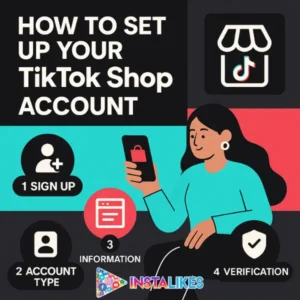
TikTok has made the setup process surprisingly smooth — but you still want to do it right the first time. Here’s how:
✅ Step 1: Go to TikTok Seller Center
Head over to seller.tiktok.com and choose your region. Log in using your existing TikTok account or create one with your email or phone number.
✅ Step 2: Choose Your Seller Type
- Individual Seller – You’re a creator or solo entrepreneur
- Business Seller – You run a registered company and have tax documents to prove it
Pick the one that fits, and TikTok will ask for the right documents based on your choice.
✅ Step 3: Verify Your Identity
This part is crucial. Upload the necessary documents:
- For individuals: A valid ID (passport, driver’s license, or national ID)
- For businesses: Business registration documents + ID of the company rep
💡 Tip: Make sure your photos are clear. No glare. No blurry text.
✅ Step 4: Accept the Terms & Submit
Check the agreement box and send in your application. Most accounts get reviewed within 1–3 days. TikTok will email you once you’re approved (or tell you what needs fixing).
✅ Step 5: Link Your Bank Account
After approval, you’ll need to set up your payout info. This part must be done correctly — or you won’t get paid.
- Use the exact same name that’s on your TikTok Shop and ID
- Enter your bank name, account number, and address
Mismatch = delays or frozen payouts.
✅ Step 6: Final Shop Setup
Add the essentials:
- Warehouse/pickup and return addresses
- Contact phone number
- Your shop name and product categories
Once you’ve filled out all the fields and your docs are approved — you’re live!
🛍️ How to Add Products to Your TikTok Shop
Now comes the fun part: adding your products. Inside Seller Center, go to Manage Products > Add Product.
Here’s what you’ll need:
- Product title and short description
- High-quality photos (TikTok loves bright, clear visuals)
- Price, stock quantity, and shipping details
- Variants (sizes, colors, etc.) if applicable
💡 Pro Tip: If you already sell on Shopify, you can sync your catalog directly with TikTok Shop.
You can also bulk upload up to 50 items at once using their template — perfect if you have a larger inventory.
📦 Managing Orders & Shipping
When someone buys from your shop, their order shows up in the Orders > Action Needed tab.
Here’s how to fulfill it:
- Click into the order and hit Create Label
- Choose your shipping method and buy the label
- Print and attach the label to your package
- Mark the item as “shipped” in Seller Center
Once shipped, the customer gets tracking info automatically. Fast shipping and good service help boost your Shop Health Score, which impacts your visibility on the platform.
📊 TikTok Seller Tools: Analytics, Ads & More
Inside TikTok Seller Center, you’ll find a dashboard packed with tools to help you grow.
The Essentials:
- Orders – Manage fulfillment, refunds, and returns
- Marketing – Set up promos and Shopping Ads
- Analytics – Track traffic, conversion rates, and top-performing products
Want to know what’s working? Start with the Analytics tab. You’ll see where your views come from, how many turn into sales, and which videos drive traffic to your shop.
⚠️ Common Pitfalls & How to Avoid Them
Even experienced sellers slip up. Here are the biggest TikTok Shop mistakes — and how to sidestep them.
🔒 Identity & Bank Info Don’t Match
Always use the same name across your ID, TikTok Shop, and bank account. If anything’s off, TikTok might freeze your payouts.
📷 Blurry or Expired Documents
Make sure every document is legible and valid. Rejected docs slow everything down.
⏳ Approval Takes Longer than Expected
TikTok usually reviews accounts within 1–3 business days. If you haven’t heard back, check your email — they may be asking for more info.
🚫 Listing Prohibited Products
Read TikTok’s Seller Guidelines. Avoid restricted items like weapons, fake goods, or health claims that aren’t backed up.
📦 Late Shipping
TikTok tracks your shipping performance. Late orders = lower shop score = fewer views.
🎥 Want to Sell More? Don’t Just Post — Perform

TikTok Shop isn’t just about products — it’s about performance.
The top sellers aren’t the ones with the biggest warehouses. They’re the ones who:
- Go live regularly
- Engaging content = more views = more sales
- Feature products in creative videos
- Add shopping links to their content
- Engage with their audience like pros
You already have the content. Now turn it into conversions.
🧠 Final Thoughts: TikTok Shop Is the New Frontier
Let’s be real — e-commerce is changing. Fast. TikTok Shop gives creators and small businesses a direct line to their followers’ wallets, without sending them off-platform.
By following the steps in this guide, you’re not just opening a shop — you’re building a business inside the app people already scroll daily.
So whether you’re a creator, side hustler, or small brand — this is your sign.
👉 Get in. Set up. Start selling.